
Choosing the right server rack is an important step in building a reliable IT infrastructure. Businesses use server racks to organize servers, network switches, routers, patch panels, UPS systems, CCTV equipment, and other essential hardware.
However, not every rack is designed for the same purpose. Some are suitable for small offices with limited floor space, while others are designed for large server rooms and data centers that require higher equipment capacity, structured cable management, and controlled airflow.
Understanding the different types of server racks helps businesses choose a suitable solution based on equipment size, installation environment, security requirements, available space, and future expansion.
In this guide, we explain the most common server rack types, their advantages, limitations, and practical applications.
1. Wall-Mounted Server Rack
A wall-mounted server rack is a cabinet designed to attach securely to a suitable wall. It is commonly used for networking equipment in locations where floor space is limited.
These racks are available in different heights and depths. Some models have hinged frames or removable panels to simplify installation and maintenance.
Common applications:
Small office networks
CCTV and NVR installations
Network switches and patch panels
Routers and fiber optic equipment
Small branch offices
Advantages
Saves floor space.
Keeps networking equipment organized.
Can provide a lockable enclosure.
Works well in compact installations.
Limitations
Capacity is limited by the cabinet design and mounting structure.
Deep or heavy equipment may not be suitable.
Wall strength and correct anchoring are essential.
Before installation, verify the rack’s load rating, the wall’s structural capacity, and the weight of all equipment and accessories.

2. Floor-Standing Server Rack
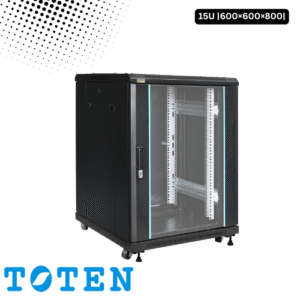
A floor-standing server rack is a cabinet supported by the floor rather than mounted on a wall. It is commonly used when an installation requires more rack space, greater equipment capacity, or room for expansion.
These cabinets are available in various heights, depths, and widths, depending on the manufacturer and intended application.
Common applications:
Enterprise server rooms
Data centers
Corporate IT departments
ISP network infrastructure
Large CCTV and security systems
Advantages
Can accommodate larger equipment collections.
Supports a range of rack-mounted servers and networking devices.
Often offers more options for cable management and accessories.
Can support future infrastructure expansion.
Limitations
Requires dedicated floor space.
Needs suitable access for installation and servicing.
Must be selected according to equipment weight, cooling needs, and dimensions.
A floor-standing rack is often a practical choice when the business expects its IT infrastructure to grow.
3. Open-Frame Server Rack
An open-frame server rack consists primarily of mounting posts and rails, without the doors and side panels found in an enclosed cabinet.
Open-frame designs provide convenient access to equipment and cables. They are often used in controlled environments where physical enclosure and restricted access are not the primary requirements.
Common applications:
Network laboratories
Equipment testing areas
Secure server rooms
Structured network installations
Some data center environments
Advantages
Easy access to equipment from multiple sides.
Convenient for cable routing and maintenance.
Generally offers fewer physical obstructions to airflow.
Can be simpler in construction than an enclosed cabinet.
Limitations
Provides less physical protection against unauthorized access.
Offers limited protection from dust and accidental contact.
Equipment is more exposed to the surrounding environment.
An open-frame rack can be appropriate in a controlled room, but it may not be the best option for public-facing offices or dusty environments.
4. Enclosed Server Rack Cabinet
An enclosed server rack is a cabinet with a frame, doors, and side panels surrounding the installed equipment. Depending on its design, it may include lockable doors, ventilation openings, cable-entry points, and accessory mounting options.
This is a common choice for businesses that want to organize equipment while providing a physical enclosure.
Common applications:
Corporate offices
Server rooms
CCTV control rooms
Enterprise networks
Data centers
Advantages
Helps restrict casual physical access.
Provides a more organized equipment enclosure.
Can offer better protection against accidental contact and some environmental contaminants.
Supports structured cable management and accessory installation.
Limitations
Airflow depends on the cabinet’s ventilation and the equipment layout.
The cabinet requires sufficient clearance for doors and maintenance.
Locking doors do not replace broader server room security.
An enclosed cabinet should be selected with appropriate ventilation, depth, weight capacity, and access provisions for the intended equipment.
5. Network Rack
A network rack is designed primarily to organize networking equipment and structured cabling. It may be wall-mounted, floor-standing, open-frame, or enclosed.
Typical equipment includes Ethernet switches, patch panels, routers, firewalls, and fiber optic distribution panels.
Common applications:
Office LAN infrastructure
Enterprise networking
ISP installations
Fiber distribution
Branch office networks
Advantages
Supports organized patch-panel and switch layouts.
Simplifies cable identification and troubleshooting.
Can improve access to network connections.
Helps maintain a structured network installation.
The term network rack describes the intended application rather than one specific physical design. Some network racks can also accommodate servers when their dimensions, mounting rails, and load capacity are suitable.
6. Server Rack for Data Centers
Data center racks are used in environments that host large numbers of servers, storage systems, and network devices. They are typically selected as part of a wider infrastructure plan involving power, cooling, cable management, monitoring, and physical security.
Common applications:
Enterprise data centers
Cloud infrastructure
Colocation facilities
Large-scale computing environments
Centralized storage systems
Important selection factors:
Equipment mounting compatibility
Cabinet height and usable depth
Static and dynamic load ratings, where relevant
Power distribution requirements
Cooling and airflow management
Cable routing and service access
Compatibility with the data center layout
A rack alone does not create a data center-ready installation. The surrounding power, cooling, monitoring, and safety systems are equally important.
7. Mini Server Rack
A mini server rack is a compact rack or cabinet intended for smaller equipment installations. The term does not define one universal size, so the actual dimensions and capacity must be checked.
Common applications:
Small businesses
Home labs
Retail outlets
Small CCTV systems
Branch office networking
Advantages
Requires less space than many full-size cabinets.
Can help centralize a small collection of IT devices.
May be easier to fit into a compact office.
Limitations
Offers less expansion capacity.
May not accommodate deep rack servers or large UPS units.
Requires careful attention to ventilation and cable space.
For a small installation, compare the rack’s usable U capacity and depth against the actual equipment list before purchasing.

8. High-Density Server Rack
A high-density server rack is configured to accommodate a large amount of computing equipment or processing capacity within a limited footprint.
High-density installations may involve many servers, GPU systems, storage devices, or other power-intensive equipment.
Common applications:
High-performance computing
AI and GPU infrastructure
Enterprise virtualization
Large-scale computing environments
Data center consolidation
Key considerations
Higher power demand
Increased heat output
Cooling capacity and airflow
Cable congestion
Rack load and structural requirements
Power distribution and redundancy
High-density deployments require coordinated rack, electrical, and cooling design. A cabinet should never be selected solely on the number of devices it can physically hold.
9. Soundproof Server Rack
A soundproof or acoustic server rack is designed to reduce noise from equipment such as servers, fans, and storage devices. Its effectiveness depends on the cabinet’s construction, ventilation system, equipment, and installation conditions.
Common applications:
Offices near server equipment
Small studios or control rooms
Commercial premises with noise concerns
Small IT rooms located near work areas
Advantages
Can reduce perceived equipment noise.
May help make nearby workspaces more comfortable.
Can provide a dedicated enclosure for noisy equipment.
Limitations
Acoustic insulation can affect heat removal.
Cooling fans may be required to maintain safe operating temperatures.
Noise reduction varies between models.
Always verify the manufacturer’s acoustic performance claims and cooling specifications. Reducing noise must not come at the expense of equipment temperature control.
10. Telecom Rack
Common applications:
Telecom rooms
Telephone exchanges
PABX and VoIP infrastructure
ISP installations
Fiber distribution systems
Telecom racks come in different physical configurations. Some use the familiar 19-inch equipment mounting standard, while other installations may use different standards or specialized mounting arrangements.
Always verify compatibility with the equipment before choosing a rack.
Comparison of Different Server Rack Types
| Rack type | Best suited for | Main consideration |
|---|---|---|
| Wall-mounted | Small networks and CCTV | Wall strength and load |
| Floor-standing | Larger IT installations | Floor space and capacity |
| Open-frame | Controlled equipment rooms | Limited physical enclosure |
| Enclosed cabinet | Offices and server rooms | Ventilation and access |
| Network rack | Switches and patch panels | Cable management |
| Data center rack | Enterprise infrastructure | Power and cooling |
| Mini rack | Compact installations | Limited capacity |
| High-density rack | Dense computing systems | Heat and power |
| Soundproof rack | Noise-sensitive locations | Acoustic performance and cooling |
| Telecom rack | Voice and telecom systems | Equipment compatibility |
These categories are not mutually exclusive. For example, a rack may be both floor-standing and enclosed, or wall-mounted and intended for networking equipment.
How to Choose the Right Type of Server Rack
Choosing the right rack begins with understanding the equipment and the installation environment.
1. Identify the Equipment
List all servers, switches, patch panels, routers, UPS units, and other devices that need to be installed. Check their mounting requirements and dimensions.
2. Determine Rack Height
Calculate the total rack units required by the equipment, then allow additional capacity for future expansion.
3. Check Rack Depth
Confirm that the cabinet can accommodate the deepest equipment, including the necessary space for cables, connectors, and servicing.
4. Evaluate Weight Capacity
Check the rack’s load rating and make sure the installation method and floor or wall structure are suitable.
5. Plan Airflow
Consider the heat output of the equipment, its airflow direction, the cabinet ventilation, and the cooling available in the room.
6. Consider Security
Choose between open and enclosed designs based on the physical security requirements. Lockable cabinets can help restrict access, but they are only one part of a security plan.
7. Plan Cable Management
Ensure there is sufficient space for power and network cables, patch panels, cable managers, and future connections.
8. Consider Future Expansion
Choose a rack that can accommodate planned equipment additions without creating avoidable cooling, power, or access problems.
Which Server Rack Is Best for Different Applications?
For CCTV systems
A wall-mounted or compact enclosed rack may be suitable for NVRs, network switches, and patch panels, provided depth and weight requirements are met.
For corporate offices
An enclosed floor-standing rack can be appropriate when multiple servers, networking devices, and power accessories need to be organized together.
For ISP and telecom networks
A network or telecom rack with suitable mounting compatibility and cable management is often a practical option.
A suitable floor-standing enclosed rack should be selected as part of an overall plan for equipment capacity, power, cooling, cabling, and maintenance.
Frequently Asked Questions
What are the main types of server racks?
Common types include wall-mounted racks, floor-standing racks, open-frame racks, enclosed cabinets, network racks, mini racks, data center racks, high-density racks, soundproof racks, and telecom racks.
What is the difference between an open rack and an enclosed rack?
An open rack provides access to equipment without full doors and side panels. An enclosed rack surrounds equipment with a cabinet structure and may provide lockable doors and other physical protection.
Which server rack is best for a small office?
A wall-mounted rack or compact enclosed cabinet may be suitable, depending on the equipment’s size, weight, depth, cooling needs, and potential for future expansion.
Are server racks and network racks the same?
Not always. A server rack is often selected for servers and deeper equipment, while a network rack commonly organizes switches and structured cabling. However, their applications overlap, and either may support both types of equipment if compatible.
What size server rack do I need?
Calculate the rack units required by your equipment, check the required depth and weight capacity, and allow room for accessories, airflow, cable management, and future growth.
Can a server rack be used for CCTV equipment?
Yes. Suitable racks can organize NVRs, switches, patch panels, UPS systems, and related security equipment. Select the cabinet based on the actual dimensions and installation requirements.
Is an enclosed server rack better than an open-frame rack?
It depends on the environment. An enclosed rack can provide a physical barrier and a more complete cabinet structure, while an open-frame rack provides convenient access. Cooling, security, dust exposure, and maintenance requirements should guide the choice.
Understanding the different types of server racks helps businesses choose the right equipment enclosure for their IT infrastructure. Wall-mounted racks suit many compact installations, floor-standing racks support larger equipment collections, open-frame racks offer convenient access, and enclosed cabinets provide a more complete physical enclosure.
The best choice depends on your equipment, available space, rack height and depth, weight capacity, airflow, security, and future expansion requirements.
For businesses in Bangladesh planning a server room, CCTV installation, ISP network, or corporate IT infrastructure, compare these factors before purchasing a rack. A well-selected server rack can make equipment organization, maintenance, and future upgrades easier.