Anyone who’s ever worked in a data center or server room knows the nightmare of tangled cables. Poor cable management isn’t just an eyesore—it’s a serious operational risk that can lead to downtime, overheating, and hours of troubleshooting when you need to trace a single connection. Whether you’re setting up a new rack or reorganizing an existing one, proper cable management is essential for maintaining a professional, efficient, and safe infrastructure.
Why Server Rack Cable Management Matters
Before diving into the tips, let’s understand why this matters. Proper cable management delivers tangible benefits that directly impact your bottom line:
Improved Airflow: Messy cables obstruct ventilation pathways, forcing cooling systems to work harder and increasing energy costs. Clean cable routing ensures optimal airflow through your equipment, preventing hot spots that can damage sensitive hardware.
Faster Troubleshooting: When you need to trace a connection or replace a faulty cable at 2 AM, organized cables can mean the difference between five minutes and five hours of downtime. Color-coded, labeled cables let you identify and resolve issues quickly.
Reduced Downtime: Accidental disconnections happen far less often when cables are properly secured and routed. A stray cable getting caught during maintenance can bring down critical services.
Professional Appearance: For businesses that host client tours or undergo audits, a clean server rack demonstrates competence and attention to detail.
Easier Scalability: Well-organized racks make it significantly easier to add new equipment or make changes without disrupting existing connections.
Now, let’s explore the ten essential tips that will transform your server rack from chaos to clarity.
1. Plan Before You Plug
The biggest mistake in cable management happens before a single cable is run: lack of planning. Before connecting anything, map out your infrastructure on paper or using network diagramming software.
Identify which devices need to connect to which switches, power distribution units (PDUs), and network ports. Consider cable lengths, routing paths, and how you’ll group similar cables together. This upfront planning prevents the need to re-cable later, which wastes both time and money.
Think about future growth too. Will you need to add servers in six months? Plan your cable pathways with expansion in mind, leaving space for additional runs without disrupting your current setup.
2. Invest in Quality Cable Management Accessories
Don’t cut corners on cable management hardware. The right accessories make all the difference between a temporary fix and a lasting solution.
Vertical Cable Managers: These mount on the sides of your rack and provide channels for routing cables vertically. Look for models with fingers or D-rings that keep cables organized without restricting access.
Horizontal Cable Managers: Install these between equipment for horizontal cable routing. They’re essential for patch panel installations and keep cables from drooping in front of equipment.
Velcro Cable Ties: Unlike zip ties, Velcro straps are reusable and won’t damage cables when you need to make changes. They’re gentler on cables and infinitely adjustable.
Cable Troughs and Raceways: For larger installations, these provide protected pathways for cable bundles, especially useful for power cables that should be separated from data cables.
Brush Grommets: These allow cables to pass through rack openings while maintaining a clean appearance and improving airflow by sealing unused space.
3. Separate Power and Data Cables
This isn’t just about organization—it’s about preventing electromagnetic interference (EMI) that can degrade network performance. Power cables carry electrical current that can induce interference in nearby data cables, especially at higher data rates.
Run power cables on one side of the rack and data cables on the other. If they must cross, do so at a 90-degree angle to minimize interference. Many cable managers have separate channels specifically designed for this separation.
For critical applications, consider shielded twisted pair (STP) cables or fiber optic connections, which are immune to EMI.
4. Use the Right Cable Lengths
Nothing clutters a rack faster than excess cable. Those convenient pre-made patch cables in standard lengths often leave you with three feet of extra cable when you only needed six inches.
Measure the actual distance between connection points and order or create custom-length cables. Yes, this requires more upfront work, but the result is dramatically cleaner. Many vendors offer custom cable lengths in one-inch increments.
For frequently changing connections, keep a small stock of various lengths nearby, but avoid the temptation to “make do” with a longer cable just because it’s available.
5. Implement a Color-Coding System
Color-coding transforms troubleshooting from detective work into a simple visual reference. Establish a consistent color scheme and document it clearly.
Common color schemes include:
- Blue: Network connections between switches
- Yellow: Internet or WAN connections
- Red: Critical infrastructure or management interfaces
- Green: Server-to-switch connections
- White: Storage network or SAN connections
- Black: Power cables (if using colored power cables)
Whatever system you choose, consistency is key. Document your color scheme and ensure everyone on your team follows it.
6. Label Everything Comprehensively
Even with perfect cable management and color-coding, labels are your insurance policy. Use a professional label maker to create durable, easy-to-read labels for both ends of every cable.
Include relevant information such as source device, destination device, port numbers, and VLAN information if applicable. Place labels close to the connector where they’re visible even when cables are bundled together.
Don’t forget to label the ports on your equipment too. A simple label above each port identifying what’s connected makes changes and troubleshooting exponentially faster.
7. Service Loops: Your Secret Weapon
A service loop is a deliberate small amount of slack cable left near connection points. This might seem counterintuitive when you’re trying to minimize cable length, but service loops are invaluable.
They provide just enough slack to disconnect and reconnect equipment without having to re-run cables. When you need to replace a failed switch or move equipment one rack unit up or down, that small loop of cable prevents a complete re-cabling job.
Create service loops of about 6-12 inches near critical connection points, neatly coiled and secured with Velcro ties.
8. Front-to-Back Cable Routing
Always route cables from the front of the rack to the back, not across the front of equipment. This keeps the working face of your equipment accessible and maintains proper airflow.
Use the cable management arms included with many servers—these allow cables to stay connected even when you pull equipment forward for maintenance. For switches and patch panels, route cables through vertical or horizontal cable managers to the rear of the rack, then back to the connection points.
9. Regular Maintenance and Audits
Cable management isn’t a one-time project. Schedule quarterly audits to ensure your system stays organized. During these reviews, remove decommissioned cables, verify labels are still legible, and address any areas where cables have become disorganized.
Create a change management process that requires proper cable management for any new installations. Make it a standard operating procedure that all additions follow your established guidelines.
Document any changes in your network diagram immediately. Outdated documentation is almost worse than no documentation at all.
10. Don’t Over-Tighten Cable Bundles
While it’s tempting to cinch cable bundles as tightly as possible for a ultra-clean appearance, over-tightening can damage cables and reduce performance. Ethernet cables, in particular, are sensitive to being compressed or kinked.
Keep cable ties snug but not tight. You should be able to slide them along the bundle with moderate resistance. For fiber optic cables, be especially careful not to exceed their minimum bend radius—violating this can cause signal loss or permanent damage.
Group cables in bundles of 10-24 cables maximum. Larger bundles become unwieldy and make it difficult to add or remove individual cables without disturbing the entire bundle.
Implementing these ten cable management tips requires an upfront investment of time and resources, but the payoff is substantial. You’ll spend less time troubleshooting, reduce the risk of accidental disconnections, improve cooling efficiency, and create an infrastructure that’s ready to scale with your business needs.
Remember that good cable management is an ongoing practice, not a one-time project. By maintaining standards and conducting regular audits, your server racks will remain organized, efficient, and professional for years to come. Whether you’re managing a single rack in a closet or dozens in a data center, these principles will serve you well and demonstrate the professionalism that separates expert IT operations from amateur setups.
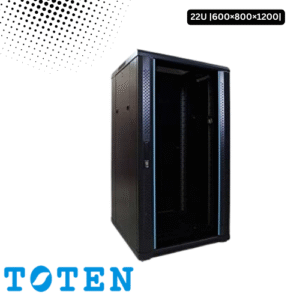
Toten 22U Server Rack 600x800x1200
৳ 30,000.00
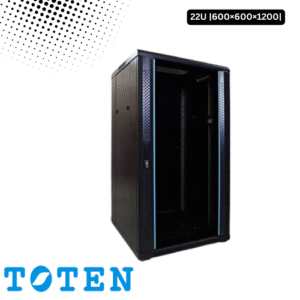
Toten 22U Server Rack 600x600x1200
৳ 27,000.00

Toten 32U Server Rack 600x600x1600
৳ 35,000.00

Toten 32U Server Rack 600x800x1600
৳ 40,000.00